For years, iPhone users in India watched friends abroad tap their phones to pay, while they reached for a wallet or opened a UPI app.
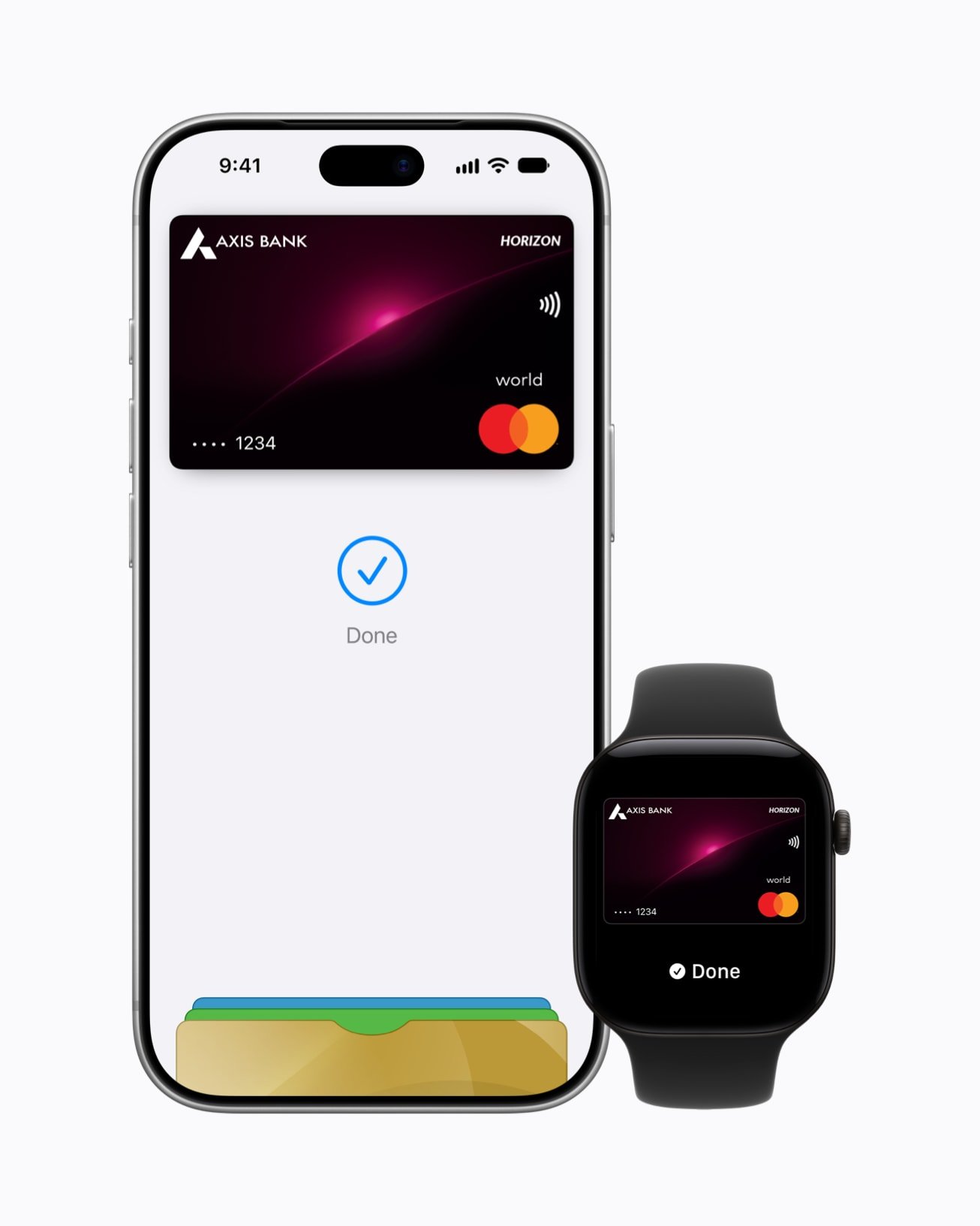
That’s finally changing. Apple Pay is now available in India, letting you pay with your iPhone, Apple Watch or iPad in stores, in apps and online.
But the launch comes with an important catch: at the start, support is limited to Axis Bank credit cards, and Apple Pay in India doesn’t replace UPI.
Here’s what Apple Pay in India offers today, how to set it up, how safe it is and whether it’s worth switching to.
Quick Take
Apple Pay in India lets you add a supported card to the Wallet app and pay by tapping your iPhone or Apple Watch.
- Currently supports Axis Bank Visa and Mastercard credit cards
- Works on iPhone, Apple Watch and iPad, but not yet on Mac
- Pay in stores with a contactless terminal, and online or in apps with the Apple Pay button
- Your card number isn’t shared with merchants, and Apple charges no fees
- It does not support UPI, debit cards or other banks yet
Table of Contents
What Is Apple Pay?
Apple Pay is Apple’s digital wallet and contactless payment service. You add your card to the Wallet app, then pay by holding your iPhone or Apple Watch near a card terminal and confirming with Face ID, Touch ID or your passcode.
It has been available in many countries for years. With its arrival, Apple Pay in India brings the same tap-to-pay experience to Indian iPhone users.
What’s Available With Apple Pay in India Right Now
According to Apple’s official India and support pages:
- Supported bank: Axis Bank
- Supported cards: Axis Bank Visa and Mastercard credit cards
- Supported devices: iPhone, Apple Watch and iPad; Axis cards can’t currently be used with Apple Pay on Mac
- Where you can pay: in stores with a contactless payment symbol, and online and in apps that show the Apple Pay button
Apple says more banks are added over time, but hasn’t announced when other Indian banks, debit cards or RuPay cards will be supported. If you don’t have an Axis Bank credit card, you’ll need to wait for your bank to join.
How to Set Up Apple Pay in India
- Open the Wallet app on your iPhone.
- Tap the + (plus) button.
- Choose Debit or Credit Card and scan or enter your Axis Bank credit card details.
- Complete verification with your bank. Apple notes that an extra step, such as an OTP or approval in your bank’s app, may be required.
- Once verified, your card appears in Wallet and is ready to use.
To use Apple Pay on an Apple Watch, open the Watch app on your iPhone, go to Wallet & Apple Pay and add your card there as well.
You’ll only ever receive an OTP from your bank during setup. Never share it with anyone who calls or messages you claiming to help you activate Apple Pay; that’s a common trick in phishing scams.
How to Pay With Apple Pay
In stores
- iPhone with Face ID: double-click the side button, look at your iPhone, then hold it near the card terminal
- iPhone with Touch ID: rest your finger on Touch ID and hold the phone near the terminal
- Apple Watch: double-click the side button and hold the watch near the terminal
Look for the contactless payment symbol on the card machine. Apple says in-store payments work even if you’re not connected to the internet or mobile data.
For larger amounts, the terminal may still ask for your card PIN, depending on the merchant and card rules.
Online and in apps
At checkout, choose the Apple Pay button, review your payment and delivery details, and confirm with Face ID or Touch ID. You don’t need to type your card number or delivery address each time.
Is Apple Pay Safe?
Apple Pay is designed to be safer than handing over or typing your physical card details:
- Your card number stays hidden: Apple Pay uses a unique code for each purchase, so merchants never see your actual card number
- Not stored on Apple’s servers: Apple says your real card number isn’t stored on its servers or shared with merchants
- Biometric approval: every payment needs Face ID, Touch ID or your passcode
- No data selling: Apple says it doesn’t sell your transaction data for third-party marketing or advertising
If your iPhone is lost, you can use Find My to lock it or erase it, which removes your cards from Apple Pay. For more on keeping your accounts safe, see our guide on protecting your online privacy.
Apple Pay vs UPI: Which Should You Use?
This is the question most Indian iPhone users will ask. The short answer: they do different jobs.
- UPI works with almost every bank account, is accepted by small shops and street vendors through QR codes, and is free for most everyday payments
- Apple Pay in India currently works only with Axis Bank credit cards, and in stores it needs a contactless card terminal
- Apple Pay is faster at card machines and online checkouts, and keeps your card number private
- Credit card payments through Apple Pay can earn your card’s usual reward points and give you credit-card protections
For most people, Apple Pay is a convenient addition for card payments at malls, restaurants and online stores, not a replacement for UPI.
Who Should Use Apple Pay in India Right Now?
Worth setting up if you:
- Have an Axis Bank Visa or Mastercard credit card
- Often pay by card in malls, restaurants, fuel stations or online
- Wear an Apple Watch and want to pay without your phone or wallet
- Want your card number kept private from merchants
You can wait if you:
- Don’t have an Axis Bank credit card
- Mostly pay by UPI or debit card
- Shop mainly at small local stores that use QR codes
What’s Still Missing
- Support for other Indian banks
- Debit cards and RuPay cards
- UPI integration
- Apple Pay on Mac with Axis cards
Expect the list of supported banks to grow over time, as it has in other countries. We’ll update this article as new banks are added.
Aadyanix Verdict: Is Apple Pay in India Worth It?
Apple Pay in India is a welcome and long-awaited launch. It’s fast, private and secure, and paying with a tap of your iPhone or Apple Watch feels genuinely convenient.
But at launch, it’s a limited service. If you have an Axis Bank credit card, set it up today; it takes two minutes. Everyone else will need to wait for their bank to join.
And either way, keep UPI on your phone. For now, Apple Pay is a great companion to UPI, not a replacement.
Thinking of switching to an iPhone? Read what to consider before buying your next smartphone first, and if you’re shopping during the festive season, our guide to spotting real festive sale deals will help you pay the right price.
Apple Pay in India: Frequently Asked Questions
Is Apple Pay available in India?
Yes. Apple Pay is now available in India on iPhone, Apple Watch and iPad, currently with Axis Bank Visa and Mastercard credit cards.
Which banks support Apple Pay in India?
At the moment, Apple lists Axis Bank as the supported bank in India, for Visa and Mastercard credit cards. More banks may be added later.
Does Apple Pay support UPI?
No. Apple Pay in India currently works with supported credit cards only. You’ll still need a UPI app for UPI payments.
Does Apple charge a fee for Apple Pay?
No. Apple says it doesn’t charge any fees for using Apple Pay in stores, online or in apps. Your bank’s usual card charges still apply.
Can I use Apple Pay without internet?
Yes, for in-store contactless payments. Apple says Apple Pay works in stores even without an internet or mobile data connection.